Calendar 2026 Launcher brings your agenda onto Android home screens
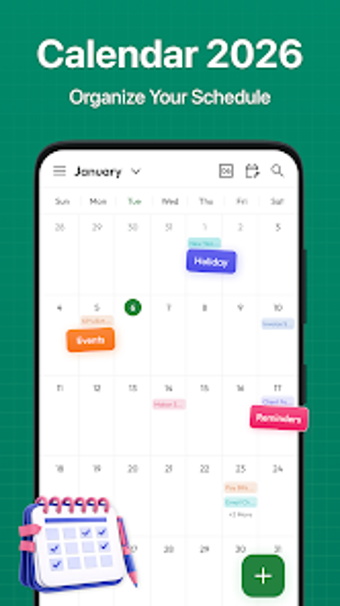
CalendarLauncher from Daily Planner Player is an Android productivity tool that replaces the home screen to prioritize scheduling and tasks. It merges a calendar, task manager, and launcher to present daily, weekly, monthly, and yearly views without opening a separate app. Key highlights include one-swipe monthly access, built-in public holiday lists, and an After Call task prompt. The app targets busy professionals, students, and families who need immediate agenda visibility on their device.
What is Calendar used for in a workplace or student workflow?
Calendar acts as a hybrid launcher and planner that puts scheduling at the device surface, so users check appointments without launching a separate calendar app. The app supports daily, weekly, monthly, and yearly perspectives for planning, and it combines event creation and task tracking in the same interface. That design is suited to people who need persistent, glanceable itinerary information during a workday or class schedule.
How does the app structure core planning and follow-up tasks?
The primary workflow emphasizes rapid capture and follow-up: users create and edit meetings and to-dos from the main interface, and an After Call task manager prompts scheduling or notes after phone calls. A one-swipe gesture exposes a full monthly view, which reduces the number of app switches needed to check availability. The integrated task manager keeps deadlines adjacent to calendar events, supporting linear daily planning.
Is the interface and onboarding appropriate for professionals and families?
Because the app functions as a launcher, installing it changes the standard home screen layout, so some setup time is necessary. Personalization options such as themed wallpapers and color-coding for event types help tailor the workspace, and customizable widgets display upcoming items at a glance. These visual choices help reduce cognitive load once users adapt to the new launcher-centered arrangement.
How does Calendar handle compatibility, sharing, and day-to-day reliability?
The tool runs on Android and requires a compatible launcher-capable device, typically Android 5.0 and up, while keeping existing apps accessible through the new interface. It includes preloaded public holiday lists for multiple countries to aid international planning. The app is part of an annual planner series and is recognized for its utility and launcher-based convenience, which suggests consistent updates and maintenance from the developer.
Calendar is a practical choice for users who accept a launcher-focused workflow
Calendar is a practical option for busy professionals, students, and families who need constant, front-and-center schedule awareness on their device. Expect a trade-off in that it changes your home screen layout and requires an adjustment period. Those who prefer separate apps or minimal launcher changes may find the approach disruptive, while anyone comfortable with a launcher replacement gains immediate agenda visibility.